logo AnimeChess Hub
  • Home
  • Thinking
  • Thi
  • Arcade
  • Classic
  • Rpg
  • About
Sign In
Profile Logout
AnimeChess Hub AnimeChess Hub
  • Home
  • Thinking
  • Thi
  • Arcade
  • Classic
  • Rpg
  • About
Sign In
  1. Home
  2. /
  3. Cube City Cruise Challenge
Cube City Cruise Challenge

Cube City Cruise Challenge

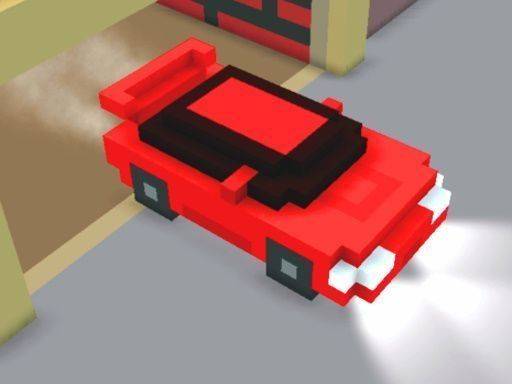
Cube City Cruise Challenge is a casual arcade racer set in a city built from colorful cubes. Drive freely or race against the clock, and challenge a friend in local two-player mode using simple keyboard controls.

PLAY NOW

Report an Issue

Update Time

2026-10-01

Publisher

Jump Start Games

Release Date

Tags

Racing , Driving , Family Friendly , Casual , Arcade , Block Style

Rating

Platform

Html5


Reviews

About this game

A Blocky World Built for Driving

Every part of Cube City Cruise Challenge—from the roads and buildings to the trees and the cars themselves—is made of small, brightly colored cubes. This consistent blocky style gives the city a clean, cheerful look that is easy to recognize. The layout mixes straight avenues, gentle curves, and open plazas, so there is room for relaxed cruising as well as more focused driving. The environment stays visually appealing even after repeated visits, which supports the game's pick-up-and-play nature.

Simple Controls, Strategic Boost

Steering and acceleration use basic keyboard inputs, and a single extra key triggers a temporary speed boost. The control scheme takes seconds to learn, making it welcoming for young children or anyone new to driving games. The boost adds a layer of timing and decision-making: using it on the right stretch of road can make the difference in a race, while wasting it early leaves you without that extra push later. This balance keeps the experience engaging for more experienced players without complicating the basics.

Free Drive and Timed Races

Two main modes shape the experience. Free Drive removes all time pressure, letting you wander the cube city at your own pace—ideal for relaxing or practicing vehicle handling. Race mode adds a timer and challenges you to complete a set course as quickly as possible. In both modes, the focus stays on driving skill and boost management rather than story or unlocks.

Local Two-Player Competition

The game supports local multiplayer on a single computer. Each player uses a separate set of keys for steering and boosting, so friends or family can race head-to-head without extra hardware or an internet connection. The direct contest turns each race into a test of driving lines and boost timing, adding a social layer to the simple mechanics.

Replay Value Through Time and Rivalry

There is no story mode or level progression. Instead, replay value comes from race mode: beating your own best times or challenging others in two-player matches. The responsive controls make short sessions easy to start, and the blocky world remains pleasant to look at. Variety emerges from improving lap times and learning where to use the boost on different sections of the track.
Editorial Notes

Boost timing adds depth

The single-key boost is the main strategic element. Deciding when to trigger it—on a straight or before a curve—directly affects race outcomes, giving simple controls a layer of decision-making that rewards practice.

Local multiplayer without extra gear

Two-player mode uses separate keyboard keys on one computer, removing the need for controllers or internet. This makes it easy to set up quick head-to-head races, though it requires sharing a single screen and keyboard.

No progression, but time trials

Without a story or unlock system, replay value relies on beating personal best times or competing locally. Players who need constant unlocks may find less to chase, but those who enjoy self-improvement will appreciate the focus.

Blocky visuals stay clear

The cube-based city is not just a style choice; it keeps roads, turns, and plazas easy to read at speed. That clarity helps new drivers learn tracks quickly and reduces visual clutter during races.

Compatibility

▸ Desktop: Chrome / Edge / Firefox / Safari
▸ Mobile: iOS Safari / Android Chrome
▸ Tablet: iPadOS Safari / Android Tablet Browser
Keep your browser updated for the best experience

Share:

Faq

Can I play Cube City Cruise Challenge with a friend on the same computer?
Yes. The game includes a local two-player mode where each player controls their own cube car using separate keyboard keys. No internet connection or additional hardware is required. You race head-to-head on the same screen, which makes it easy for friends or family to compete directly.
Does Cube City Cruise Challenge have a story mode or level progression?
No. Cube City Cruise Challenge does not include a story mode or level progression. The main replay value comes from race mode, where you can try to beat your own best times or challenge another player in two-player matches. Free Drive mode also lets you explore without any objectives.
What is the speed boost and how do I use it?
The speed boost is a temporary increase in speed activated by a single extra key. You can use it strategically during races to gain an advantage on straight sections or before curves. Timing matters: using it too early may leave you without a boost when you need it most.
Is Cube City Cruise Challenge suitable for young children?
The game is designed to be approachable for young children and anyone new to driving games. Steering and acceleration use simple keyboard inputs that can be learned within seconds. The blocky, colorful visuals and lack of complex menus also make it easy for kids to enjoy, though reading basic instructions may still help.
What is the difference between Free Drive and Race mode?
Free Drive removes all time pressure, allowing you to wander the cube city at your own pace. It is ideal for relaxing or practicing vehicle handling. Race mode introduces a timer and challenges you to complete a set course as quickly as possible. Both modes use the same simple controls and boost mechanic.
Can I play Cube City Cruise Challenge online against other players?
No. Cube City Cruise Challenge only supports local multiplayer on a single computer. There is no online multiplayer or internet connection required. Two players share the same keyboard, each using a distinct set of keys for steering and boosting. This keeps the focus on face-to-face competition.

Follow Us

Comments

0 comments
U
User
★ ★ ★ ★ ★
Please login to post a comment.
Loading comments...

Other Similar Games

Urban Guardian: Jump & Solve
Platformer Puzzle Action

Urban Guardian: Jump & Solve

Flutter Flight Challenge
Arcade Casual Reflex

Flutter Flight Challenge

Timberland Fox: Pathfinding Adventure
Casual Animal Platformer

Timberland Fox: Pathfinding Adventure

Frosty Penguin Catch
Animal Casual Pixel

Frosty Penguin Catch

Orchard Dash: Fruit Collector
Casual Adventure Hyper Casual

Orchard Dash: Fruit Collector

Grid Claim: Logic Expansion
Logic Puzzle Spatial Strategy Casual

Grid Claim: Logic Expansion

Find the Hidden Variations Challenge
Relaxed Observation Quick Play

Find the Hidden Variations Challenge

Stumble Guys Puzzle Challenge
Kids Educational Puzzle

Stumble Guys Puzzle Challenge

Endless Path Runner Adventure
Action Arcade Running

Endless Path Runner Adventure

Tunnel Track Speed Rush
Driving Racing Arcade

Tunnel Track Speed Rush

Hue Stack Align
Puzzle Blocks Arcade

Hue Stack Align

Space Rescue Adventure
Action Adventure Puzzle

Space Rescue Adventure

AnimeChess Hub

CONNECT

  • Privacy Policy
  • Terms
  • Contact Us
  • About Us
  • Disclaimer

Subscribe to our Newsletter

© 2026  AnimeChess Hub All rights reserved.

Share this page

Copy the link below to share this page: